Containerized GitHub Actions Runners - Build Your Own Self-Hosted Runner
Before diving deep into orchestration in the following articles, we need something to orchestrate. In this article we build a containerized GitHub Actions self-hosted runner, small enough to read in five minutes and complete enough to run real workloads. All the code is in the companion repository: CiPipes/github_runner.
Why containers?
A container is a lightweight, portable, isolated environment that packages an application together with its dependencies. It runs your tools without touching the host system. Unlike a virtual machine, a container does not boot its own operating system: it shares the host’s kernel and gets its own isolated filesystem and processes. That is what makes containers so light.
Three terms come up throughout this article:
- An image is a versioned snapshot of a filesystem and its configuration: everything needed to run the application, including code, runtime, libraries and system tools.
- A container is a running instance of an image.
- A Dockerfile is the recipe that builds an image: the base image, the dependencies to install, and the configuration.
Because a container is built from an image, it is:
- Reproducible: the same image produces the same environment on every machine.
- Disposable: if something goes wrong, you throw it away and start a fresh one.
- Fast: a container starts in seconds, not minutes like a VM.
- Versioned: images are tagged, so rolling back to a previous environment means running the previous tag.
For a team, this means every developer works in the same environment, and that environment is also the one used by the CI. “It works on my machine” becomes “it works in the image” (trust me, I still hear that sentence every now and then in 2026…).
If you want to see what a container really is under the hood, watch Liz Rice’s talk Containers From Scratch. She builds a container live in a few dozen lines of Go, using nothing but Linux namespaces and chroot. It is the best explanation of the concept I know. To get hands-on with Docker, start with the official Docker tutorial.
Containers are also what orchestrators work with. A system like Kubernetes or Nomad can deploy containers automatically, replicate them on demand, and restart them when they fail.
Why containerize your runners?
GitHub-hosted runners are convenient, but self-hosting gives you things they cannot:
- Your own tooling: compilers, SDKs, internal CLIs and certificates are baked into the image instead of installed on every job.
- Local caching: dependencies, Docker layers and build caches stay close to the runner, so builds get faster.
- Your own hardware and network: GPUs, ARM machines, or access to internal services behind your firewall.
- Cost control: you run jobs on infrastructure you already pay for.
Running a self-hosted runner directly on a host has one big drawback: every job can change that host. Packages get installed, files are left behind, and after a few weeks no one knows exactly what state the machine is in. Putting the runner in a container fixes that. The host stays clean, and the runner can be deployed and supervised by an orchestrator like any other service. Parallelism is the other drawback: a runner runs one job at a time. To run jobs in parallel on a bare machine, you have to install and manage several runner instances side by side. With containers, you just start more replicas of the same image.
What about Actions Runner Controller (ARC)?
If you use Kubernetes, look at Actions Runner Controller (ARC) first. ARC is the official Kubernetes operator that orchestrates and autoscales self-hosted runners. Its documentation includes a Dockerfile to customize your runner image and a Helm chart to deploy the controller.
ARC is Kubernetes-only, and we might use other orchestrators, so we will build our own GitHub runner image from scratch. It is also a good way to understand what ARC does for you behind the scenes. In any case, this image can later serve as a base for an ARC runner image, with a few adjustments.
The runner image
Here is the complete Dockerfile. Let’s go through it step by step.
A lightweight base
FROM mcr.microsoft.com/dotnet/runtime-deps:8.0-nobleThe GitHub Actions runner is a .NET application. Microsoft’s runtime-deps image, based on Ubuntu 24.04 (Noble), contains only the native libraries .NET needs. The runner ships with its own .NET runtime, so we need nothing more.
Build arguments
ARG USERNAME=github_runner
ARG USER_UID=1001
ARG USER_GID=1001
ARG TARGETARCH
ARG RUNNER_VERSION=2.337.0
Everything that might change is a build argument: the user, its IDs, and the runner version. TARGETARCH is set automatically by Docker BuildKit (amd64, arm64, …). We use it later to download the right binary.
Minimal dependencies
RUN apt-get update && apt-get install -y --no-install-recommends \
  curl jq && \
  rm -rf /var/lib/apt/lists/* /var/cache/apt/archives/*
We install only curl and jq, which the entrypoint uses to call the GitHub API. This is where you add the tools your pipelines need. Clearing the apt cache in the same layer keeps the image small.
A non-root user
RUN groupadd -g ${USER_GID} ${USERNAME} || true && \
  useradd -u ${USER_UID} -g ${USERNAME} -m -s /bin/bash ${USERNAME}
A CI runner executes code from every branch and pull request it picks up. Running it as root would be asking for trouble, so we create a dedicated user with a fixed UID/GID. The GitHub Actions runner refuses to run as root by default anyway, and you would have the joy of reading “Must not run with sudo”. A fixed UID also makes file permissions predictable when you mount volumes such as a shared cache.
Multi-architecture download
RUN case "${TARGETARCH}" in \
    amd64) RUNNER_ARCH=x64 ;; \
    arm64) RUNNER_ARCH=arm64 ;; \
    arm) RUNNER_ARCH=arm ;; \
    *) echo "Unsupported TARGETARCH: ${TARGETARCH}" >&2; exit 1 ;; \
  esac \
  && curl -f -L -o runner.tar.gz https://github.com/actions/runner/releases/download/v${RUNNER_VERSION}/actions-runner-linux-${RUNNER_ARCH}-${RUNNER_VERSION}.tar.gz \
  && tar xzf ./runner.tar.gz \
  && rm runner.tar.gz
Docker’s TARGETARCH (amd64) and GitHub’s architecture names (x64) do not match, so a case statement maps one to the other. This way, the same Dockerfile builds a runner for an x86 server, a Raspberry Pi, or an ARM cloud instance. An unsupported architecture fails the build right away with a clear message.
Entrypoint
COPY runner_entrypoint.sh /usr/local/bin/runner_entrypoint.sh
RUN chmod +x /usr/local/bin/runner_entrypoint.sh
USER ${USERNAME}
ENTRYPOINT ["/usr/local/bin/runner_entrypoint.sh"]
We switch to the non-root user and hand control to the entrypoint script. That is where the runner registers itself.
Self-registration at startup
Here is what happens between docker compose up and your first job running on the runner:
sequenceDiagram
autonumber
participant C as Runner container<br/>(runner_entrypoint.sh)
participant API as GitHub REST API
participant GH as GitHub Actions
participant W as Workflow

Note over C: Container starts with GITHUB_PAT and GITHUB_ORG
C->>API: POST /orgs/ORG/actions/runners/registration-token (PAT)
API-->>C: Registration token (valid 1 hour)
C->>GH: config.sh registers name, labels, token (--replace)
GH-->>C: Runner registered, shown as Idle
C->>GH: run.sh starts and waits for jobs
W->>GH: Job with runs-on: [self-hosted, mylabel]
GH-->>C: Job assigned to the matching runner
C->>GH: Logs and result streamed back
To register a runner, GitHub requires a registration token. It is short-lived (one hour), so it cannot be baked into the image. Instead, the container requests one from the GitHub API every time it starts, using a Personal Access Token (PAT):
TOKEN_RESPONSE=$(curl -fsSL -X POST \
  -H "Accept: application/vnd.github+json" \
  -H "Authorization: Bearer ${GITHUB_PAT}" \
  "https://api.github.com/orgs/${GITHUB_ORG}/actions/runners/registration-token" | jq -r '.token')
Then it registers the runner with the organization and starts it:
~/config.sh \
  --unattended \
  --name "${RUNNER_NAME}" \
  --labels "${RUNNER_LABELS}" \
  --url "https://github.com/${GITHUB_ORG}" \
  --token "${TOKEN_RESPONSE}" \
  --replace

~/run.sh
A few flags matter here:
--unattendeddisables interactive prompts, which is required inside a container.--labelssets the labels your workflows use to target this runner.--replaceoverwrites an existing runner with the same name. When a container restarts, it takes over its old registration instead of failing because the name is already taken.
The runner is registered at the organization level, so every repository in the organization can use it.
Important
About the PAT: a classic token needs the admin:org scope. A fine-grained token needs the organization permission Self-hosted runners: Read and write. This token can manage your organization’s runners, so treat it as a secret: keep it in a git-ignored .env file locally and in your orchestrator’s secret store in production.
Running it
For a single host, Docker Compose is enough:
services:
  github-runner:
    build:
      context: .
      args:
        - USERNAME=github_runner
        - USER_UID=1001
        - USER_GID=1001
        - RUNNER_VERSION=2.337.0
    container_name: github-runner-container
    restart: always
    env_file:
      - .env
    environment:
      - RUNNER_NAME=MY_RUNNER
      - RUNNER_LABELS=mylabel
The secrets (GITHUB_PAT, GITHUB_ORG) come from .env. The name and labels are set in the Compose file. restart: always gives us a first, basic level of supervision: if the runner crashes or the host reboots, Docker starts it again.
cp .env-template .env # set GITHUB_PAT and GITHUB_ORG
docker compose up --build -d
docker compose logs -f github-runner
You should be able to see logs similar to this:
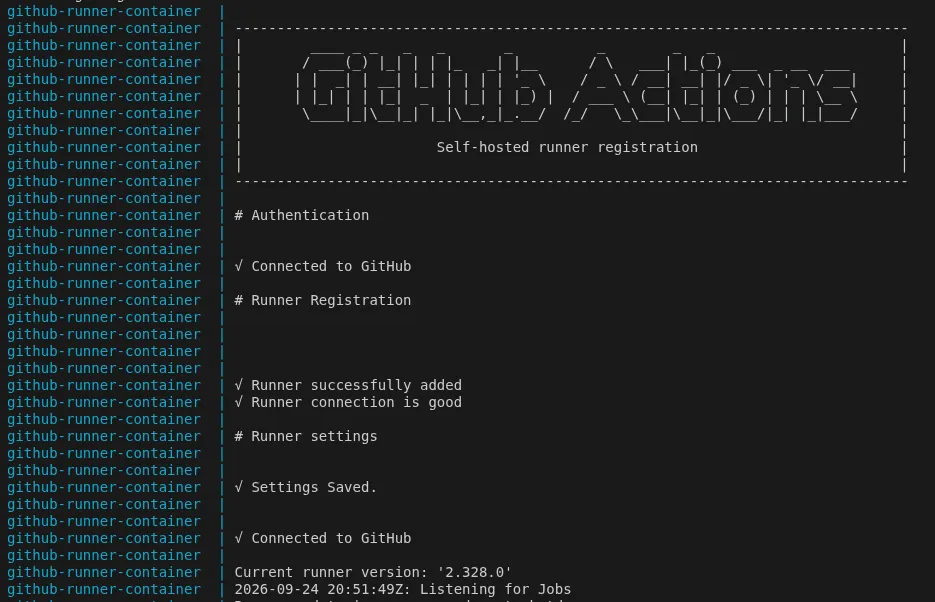
After a few seconds the runner appears under Organization settings → Actions → Runners. Target it from any workflow using its labels:
jobs:
  build:
    runs-on: [self-hosted, mylabel]
    steps:
      - uses: actions/checkout@v4
      - run: echo "Running on my own containerized runner"
Conclusion and next steps
We now have a runner image that is reproducible, disposable, and registers itself. But there are a few things we can improve:
-
Tooling: this image is intentionally minimal. To adapt it, extend the
apt-get installline with the tools your pipelines need, or build a dedicated image per team or tech stack from this base. In the next articles, we will see how to use multi-stage builds and take advantage of Docker layers to share common dependencies between teams and development stages. -
Docker inside the runner: many pipelines need to build or run containers themselves. In the next articles, we will extend this runner with DooD (Docker out of Docker, which mounts the host’s Docker socket) and DinD (Docker in Docker, using a sidecar container), and discuss the associated security risks and alternatives.
-
Health management: without ARC or a full orchestrator, a few responsibilities are in our hands:
- Health and lifecycle: something has to restart runners that crash and replace unhealthy ones. On a single host,
restart: alwayshandles this. In a cluster, it is the orchestrator’s job. - Cleaning up dead runners: if a container is killed without deregistering, GitHub keeps listing it as offline.
--replacehelps when the same name comes back, but runners with random or unique names pile up. - Scaling: ARC adds runners when jobs are queued. Here, the number of runners is whatever we have deployed.
- Health and lifecycle: something has to restart runners that crash and replace unhealthy ones. On a single host,
More orchestration and deployment techniques are coming soon, stay tuned!
Where this post fits
This post, its tags, and everything they connect to. Open the full graph →
Nothing to map yet — tag a post, or link two posts together, to see them here.
No posts or tags match your search.